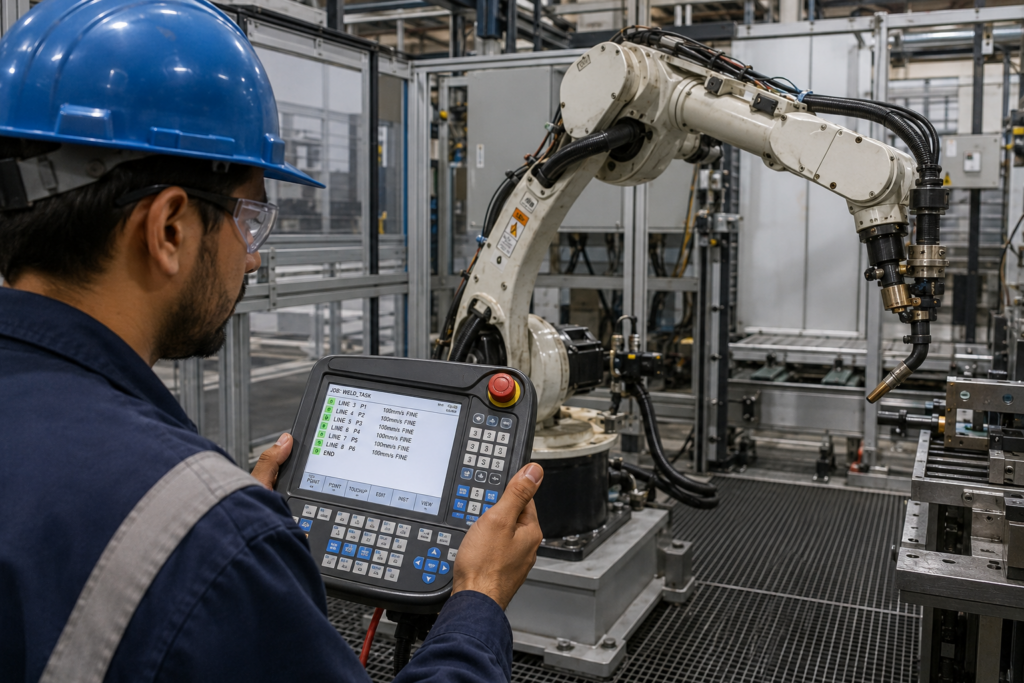
You’ve got a robot arm sitting on the floor. Maybe it’s already mounted. Maybe you’ve got a project deadline in three weeks and someone handed you the teach pendant and said “figure it out.” I’ve been there. The documentation is either 400 pages of dense OEM manual or a five-minute YouTube video that skips everything important.
This guide covers what actually matters when you’re getting started: how robot arms are programmed, which tools and languages are involved, what the real workflow looks like, and where beginners consistently get it wrong. No fluff. No theory for theory’s sake. Just what you need to get a robot arm moving correctly and safely from day one.
Understanding How Robot Arms Actually Receive Instructions
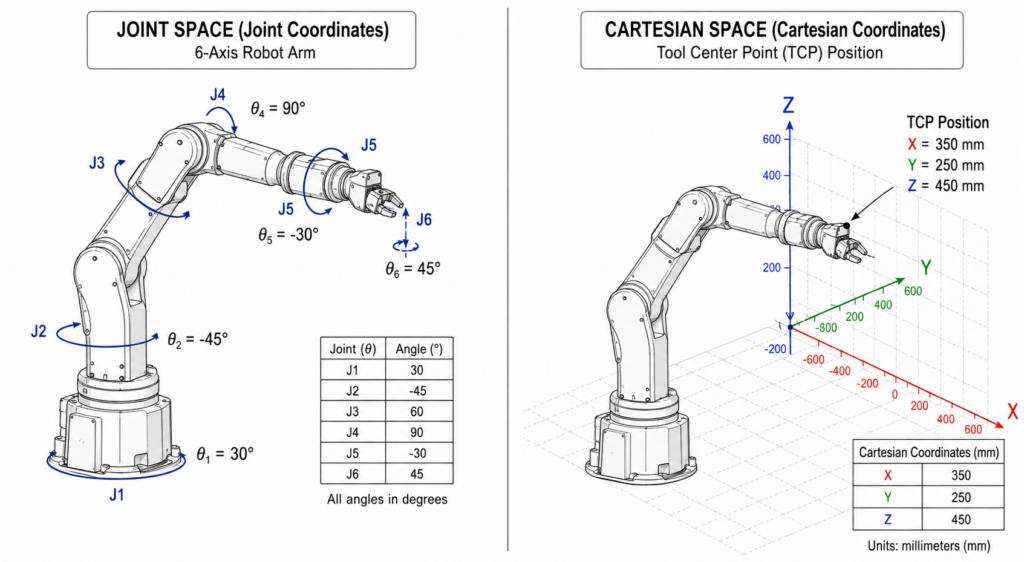
Before you touch any software, you need to understand how a robot arm interprets motion. Every robot arm operates on a coordinate system, most use either joint space or Cartesian space. Joint space moves each axis independently by degrees. Cartesian space moves the tool center point (TCP) along X, Y, Z coordinates in the real world.
When you write a program, you’re essentially telling the arm: go to this position, at this speed, with this tool active, then do this action. That sounds simple. It isn’t, until you understand how the controller interprets those instructions.
Every major OEM has its own proprietary controller. KUKA uses KRC (KUKA Robot Controller) with their KRL language. Fanuc runs on their TP (Teach Pendant) language or KAREL. ABB uses RAPID on the IRC5 controller. Universal Robots uses URScript. These are not interchangeable. A program written for a KUKA arm won’t run on a Fanuc without a full rewrite.
This is the part nobody warns beginners about. You don’t just “learn to program robot arms” you learn to program a specific robot from a specific manufacturer. The concepts transfer. The syntax does not.
That said, the logic is universal: define positions, define motion type (linear, joint, circular), set speeds and zone data, trigger I/O at the right moments. Once you’ve done it on one platform, the learning curve on the next one is much shorter.
The Three Main Ways to Program a Robot Arm
There’s more than one path here, and the right one depends on your robot, your task, and your team’s skill level.
Teach pendant programming is the most common method on the shop floor. You jog the arm to each position manually, record that position as a waypoint, then string those waypoints into a motion sequence. It’s intuitive and doesn’t require any coding background. The downside is precision jogging to a position by hand introduces repeatability errors if you’re not careful, and editing programs later is painful on most pendants.
Offline programming (OLP) is where you build the entire program in simulation software on a PC, then export it to the robot. Tools like RoboDK, KUKA.Sim, or ABB’s RobotStudio let you model the work cell, test the program, check for collisions, and optimize paths before anything moves on the floor. I’ve seen OLP cut commissioning time in half on complex welding applications. It’s the better long-term investment for any application that’s going to run for months or years.
Text-based programming means writing code directly in the robot’s native language or in a higher-level language that compiles down to it. URScript from Universal Robots is relatively approachable if you’ve done any Python. RAPID is more structured and closer to Pascal. KRL is somewhere in between. For simple pick-and-place, you probably won’t need this. For anything with conditional logic, sensor feedback, or adaptive motion, you will.
Most real-world applications end up using a combination: OLP for path design, pendant for fine-tuning, and text-based edits for logic and I/O handling.
Best Robotics Programming Languages and Tools for Beginners
If you’re coming from a software background, Python is worth knowing, not because robots run Python natively, but because it’s widely used for robot simulation, ROS (Robot Operating System) scripting, and writing the higher-level logic that talks to a robot’s API. Universal Robots exposes a remote control interface that integrates well with Python-based systems.
ROS (Robot Operating System) deserves its own mention. It’s not a programming language, it’s a middleware framework. ROS handles communication between hardware components, sensors, and software nodes. It’s the standard in research and increasingly in industrial deployments. ROS 2 is the current production-ready version. Learning ROS is a significant time investment, but it opens up the full ecosystem of tools, simulation environments (like Gazebo), and community packages. The ROS 2 documentation is genuinely good and free.
For pure beginners on collaborative robots (cobots), the graphical interfaces are the fastest entry point. UR’s Polyscope lets you build programs by dragging blocks into a flowchart. FANUC’s CRX series has a tablet-based interface that’s similarly accessible. These don’t require any coding and are specifically designed for operators without automation backgrounds.
The ISO 9283 standard for manipulating industrial robots also defines performance criteria that matter when you start evaluating accuracy and repeatability in programmed paths, worth reading once you’re past the basics.
RoboDK is the tool I’d recommend first for anyone serious about offline programming. It supports over 500 robot models, exports to most OEM controllers, and has a Python API. The learning curve is real but manageable.

Setting Up Your First Program: A Practical Walkthrough
Start with the simplest possible task: pick from point A, place at point B. Even this reveals most of what you need to know.
First, define your tool. Every robot needs to know where the tool center point is relative to the flange. If you’re using a gripper, measure the TCP offset in X, Y, and Z. Get this wrong and every position in your program is offset by that error. The first time I saw this mistake was a new engineer who skipped TCP calibration entirely , the arm moved beautifully in simulation and missed the part by 18mm every time.
Second, jog to your approach point (above the pick location), record it, jog to the pick point, record it, jog back to the approach point, record it again. You want the arm approaching from above, not swinging in from the side and clipping a fixture. Three points minimum for a simple pick: approach, pick, retract.
Third, set your speeds correctly. Don’t run at full speed during commissioning. Ever. Start at 10%, verify the path, bump to 25%, verify again. I spent three days debugging a path error that turned out to be vibration at high speed causing TCP deviation. Slow it down first.
Fourth, handle your I/O. If you have a pneumatic gripper, you need the robot to trigger the digital output that fires the solenoid, then wait for a sensor confirmation before moving. Skipping the confirmation signal is how you get dropped parts and crashed programs.
Test the full cycle manually at low speed, then run 10 cycles at 25%, then 50%, then full speed. Check for joint limits, cable interference, and fixture clearances at each step.
Common Beginner Mistakes to Avoid
Skipping TCP calibration is the biggest one. Close second: not setting proper zone data (the blending radius between waypoints), which causes the robot to either stop dead between moves or cut corners it shouldn’t. Third: ignoring singularities specific joint configurations where the robot loses a degree of freedom and behaves unpredictably. Learn where your robot’s singularities are before you find out the hard way.
Search for this video and embed it in WordPress
Safety Considerations You Can’t Skip
Robot arms don’t distinguish between a test part and a hand. This is the part of every beginner guide that gets treated as a disclaimer. It’s not a disclaimer.
Safety-rated monitored stop and collaborative speed and force limiting exist in cobot platforms for a reason. If you’re on a traditional industrial arm , KUKA KR, Fanuc M-20, ABB IRB 4600 , you’re working behind a physical guarded cell with interlocked gates. The robot stops when a gate opens. Don’t bypass interlocks to “just check something quickly.” I’ve seen it done. It ends careers.
For cobots operating in shared spaces, understand your robot’s force and torque limits and set them conservatively. UR robots allow you to set safety planes, speed limits, and force limits in the Safety Configuration menu. Configure these before any human approaches the work envelope.
Always have an emergency stop within reach. Always. Before the first jogged movement.
If you’re deploying into a real production environment, a risk assessment per ISO 10218-2 is not optional , it’s a legal requirement in most jurisdictions. Don’t ship without it.
Key Takeaways
- TCP calibration is non-negotiable. Get it wrong and every position in your program carries that error permanently.
- Learn your OEM’s native language first , URScript, KRL, RAPID , before abstracting to higher-level tools.
- Offline programming with tools like RoboDK saves significant commissioning time on any task more complex than basic pick-and-place.
- Always commission at reduced speed and increase incrementally. Full-speed testing comes after the path is fully verified.
- Safety configuration is part of programming, not a separate step. Set up monitored stops, force limits, and safety planes before anyone enters the work envelope.
Frequently Asked Questions
What programming language is used for robot arms? It depends entirely on the manufacturer. KUKA uses KRL, ABB uses RAPID, Fanuc uses TP language or KAREL, and Universal Robots uses URScript. Most also support higher-level integration via Python, ROS, or OPC UA interfaces for system-level communication.
Can a beginner program a robot arm without coding experience? Yes, especially with cobots. Universal Robots’ Polyscope and Fanuc’s CRX tablet interface are graphical and require no coding. That said, any task beyond simple motion sequences will eventually require understanding the robot’s native language or at least basic scripting logic.
How long does it take to learn robot arm programming? For basic pick-and-place on a cobot, a few days of focused effort is realistic. For complex multi-step programs with I/O handling, vision integration, and conditional logic, plan for weeks of hands-on practice. Offline programming tools like RoboDK have their own learning curve on top of that.
What is offline programming and do I need it? Offline programming (OLP) means building and testing your robot program in simulation before deploying it to the physical arm. You need it if your application involves complex paths, collision-sensitive environments, or if downtime during commissioning is expensive. For simple, low-risk tasks, pendant programming is often sufficient.
Getting Your First Robot Arm Running
The fastest way to learn this is to actually do it , not watch videos, not read manuals end-to-end, but put hands on a teach pendant and move the robot. Start with a single pick-and-place cycle. Get that clean. Then add complexity.
If you’re still evaluating which robot to start with, the platform matters as much as the task. Cobot or traditional industrial, SCARA or 6-axis , the right choice depends on your payload, reach, and environment. Browse the full selection at factoryrobots.net/shop/ to compare specs directly. If you’ve got integration questions before you commit, our engineers are available at factoryrobots.net/support/.