
You’ve seen the footage: a line of articulated arms moving in perfect sync, welding a chassis or stacking pallets at speeds no human crew could match. It looks almost magical. It’s not. It’s mechanical design, motion planning, sensor feedback, and a control loop running thousands of times per second.
If you’re trying to spec a robot for your floor, commission a cell, or just stop nodding along in meetings where you don’t fully follow the conversation , this guide is for you. We’ll walk through the actual mechanics of how industrial robots work in factories: the hardware, the control architecture, the programming layer, and the real-world variables that determine whether a deployment succeeds or becomes a very expensive learning experience.
No fluff. Let’s get to the hardware.
The Mechanical Foundation: Joints, Axes, and Payload
Every industrial robot starts with a physical structure , links connected by joints. Each joint adds a degree of freedom, meaning the robot can rotate or translate along one additional axis. A standard 6-axis articulated robot arm can position its end point (the tool center point, or TCP) anywhere within its reach envelope and orient it in any direction. That’s what makes articulated arms the workhorse of industrial automation applications.
SCARA robots (Selective Compliance Articulated Robot Arm) use four axes and trade vertical rigidity for horizontal compliance. They’re fast and excellent for pick-and-place or assembly tasks where you need consistent Z-axis force without overcomplicating the motion profile. Delta robots drop that further , typically three axes arranged in a parallel linkage , built almost exclusively for high-speed, low-payload tasks like sorting and light packaging.
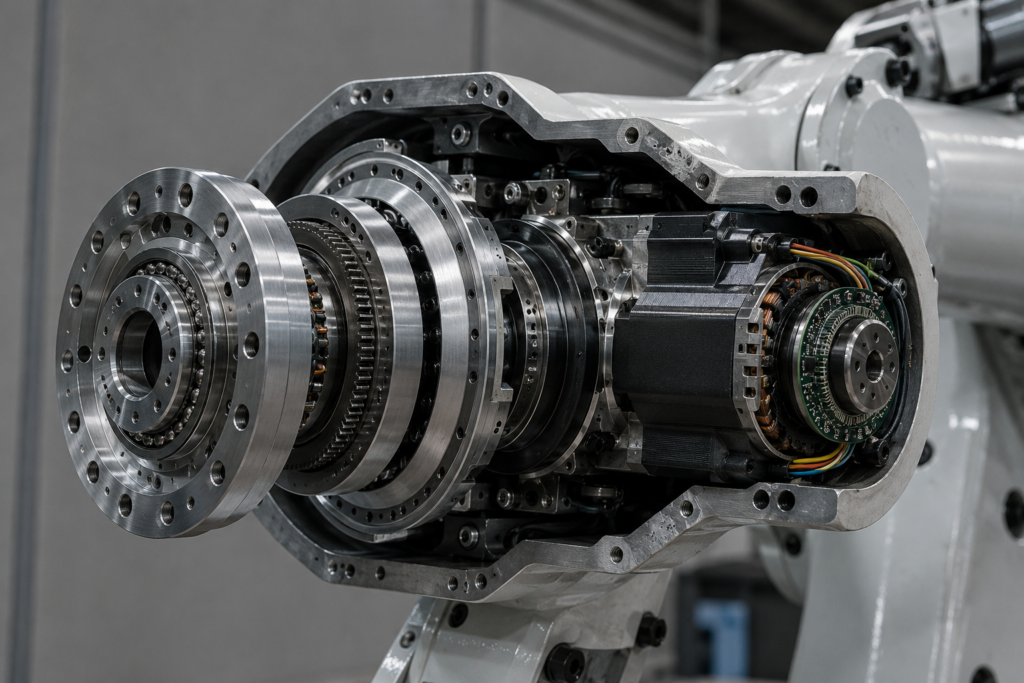
The joint itself is almost always a combination of a servo motor, a gearbox (often a harmonic drive for its zero-backlash properties), and an encoder. The encoder reads absolute or incremental position data and feeds it back to the controller. That closed-loop feedback is what separates a robot from a simple actuator.
Payload and reach are the two specs that determine whether a robot physically can do your job. Payload is rated at the wrist , it includes the weight of the end effector plus the workpiece. I’ve seen integrators spec a robot at its maximum payload rating without accounting for the gripper weight. The robot works fine in testing, then starts faulting at the end of the shift when temperatures rise and the servo drives are running at thermal limits. Always leave 20–30% headroom on payload.
The Control System: What’s Actually Running the Robot
The mechanical arm is inert without a robot controller , the computer that interprets programs, manages motion, and coordinates all six axes simultaneously. Modern controllers from FANUC, KUKA, ABB, and Yaskawa are purpose-built real-time systems. They run proprietary operating systems specifically because response latency needs to be deterministic. A Windows machine that takes 200ms to respond to an interrupt doesn’t cut it when you’re coordinating six axes at 1,000 updates per second.
The controller handles several layers at once. At the lowest level, it’s running current control loops on each servo drive , adjusting motor torque hundreds of times per second to track the target position. One layer up, it’s running the motion planner: calculating joint trajectories to move the TCP from point A to point B without exceeding velocity, acceleration, or jerk limits. Above that sits the robot program itself, executed line by line.
Communication between the controller and the rest of the cell happens over industrial fieldbus protocols , EtherNet/IP, PROFINET, DeviceNet, or Modbus TCP depending on the era and vendor. If you’re integrating a robot into an existing PLC-controlled line, the fieldbus protocol is often the first compatibility headache you’ll hit. I spent three weeks debugging intermittent faults on a new cell before realizing the robot controller and the Siemens PLC were on different subnet configurations, causing packet loss on the I/O handshake.
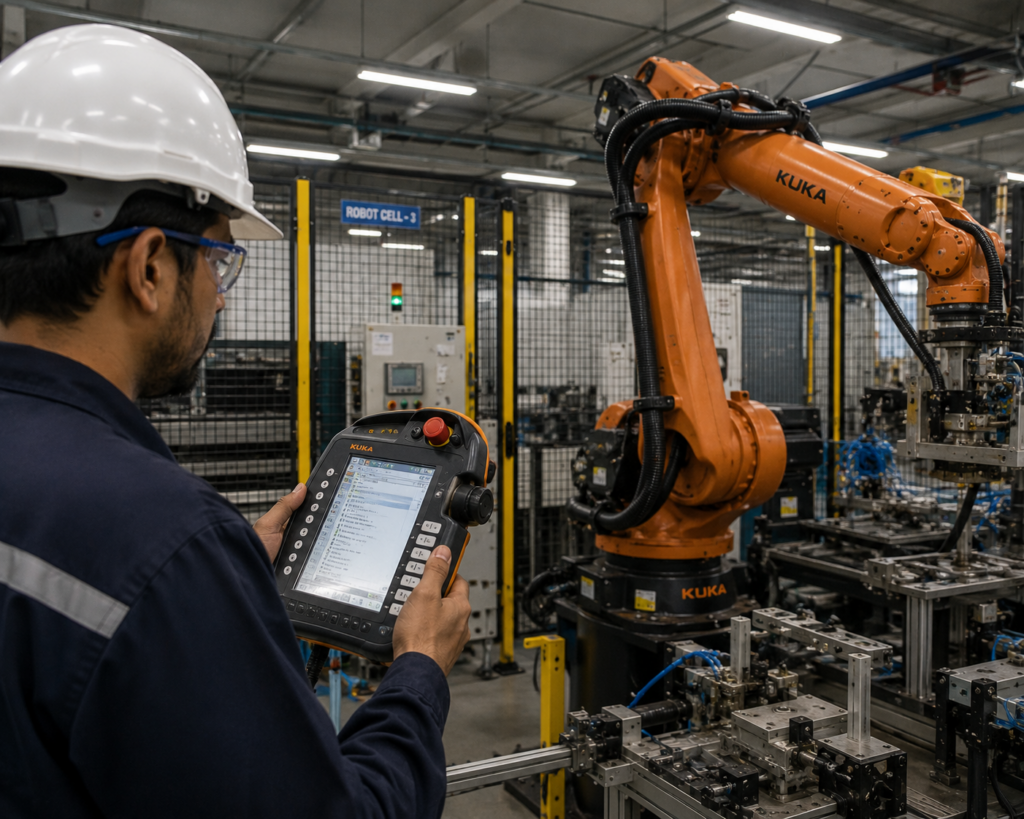
Most industrial robotics solutions today also include a teach pendant , a handheld interface that lets operators jog the robot manually, create and edit programs, and monitor fault states. The quality of the teach pendant UI matters more than people give it credit for. FANUC’s iPendant is functional but dense. Universal Robots’ Polyscope tablet interface is genuinely approachable for line technicians without robotics training.
How Robots Are Programmed: Teach, Offline, and Everything In Between
There are three main approaches to programming an industrial robot, and the right one depends on your production environment.
Teach programming is the classic method: a technician jogs the robot to each target position, records the point, and writes the logic around it (open gripper, move to position 3, close gripper, etc.). For simple pick-and-place or welding paths with fixed fixtures, it works fine. For complex paths or high-mix production, it gets painful fast.
Offline programming (OLP) uses software like DELMIA, RoboDK, or vendor-specific tools like KUKA.Sim to build and simulate robot programs on a virtual model before deploying to the real controller. The first time I saw OLP done right was a tier-1 automotive supplier running FANUC arc welding cells , they could program a new vehicle variant over a weekend without touching the physical line. The catch is that virtual-to-real accuracy depends on how well your cell fixtures match the digital model. Cell calibration is non-negotiable.
Collaborative and force-guided programming is increasingly common on lighter-duty cobots. With a Universal Robots UR10e or a FANUC CRX-10iA, you can literally grab the arm and move it through the path by hand while the robot records positions. It’s fast and intuitive , and completely inappropriate for high-speed or high-payload applications where you need tight repeatability on complex trajectories.
Repeatability , not accuracy , is the number that matters most for most factory applications. A FANUC M-20iD/25 has ±0.02mm repeatability. It will hit the same programmed point to within 0.02mm every single cycle. That’s what enables consistent weld quality or repeatable assembly torque. Visit the factory robots shop to see full repeatability specs listed on every robot we carry.
Sensors and Vision: How Robots Perceive Their Environment
A robot running a fixed program in a perfectly repeatable environment doesn’t need sensors beyond its joint encoders. The real world is messier than that.
Vision systems are the most common perception layer added to industrial robots. A 2D camera mounted at a fixed position above a conveyor (eye-to-hand configuration) or mounted directly on the robot wrist (eye-in-hand) feeds images to a vision processor that locates parts, checks orientation, reads barcodes, or verifies assembly quality. 3D structured-light and time-of-flight cameras add depth perception , essential for bin picking, where parts are randomly stacked and the robot needs to calculate grasp poses in real time.
Force/torque sensors at the wrist are the other major perception layer. These measure the forces and moments being applied at the TCP during contact tasks , insertion, grinding, polishing, or assembly with tight tolerances. The sensor data feeds back into the motion controller to modulate force in real time. Without this on a peg-in-hole task with ±0.1mm tolerances, you’re guessing.
Safety sensing deserves its own mention. Area scanners (Sick S300, Rockwell 440L safety light curtains) create configurable safety zones around a robot cell. When a person enters a zone, the robot drops to a reduced speed or full stop via a safety-rated input directly to the controller’s safety circuit , not through the PLC, not through software. It’s hardwired for a reason. ISO 10218-1 and ISO 10218-2 govern robot safety requirements and cell safeguarding standards respectively. For anyone designing a robot cell from scratch, reading those standards is not optional , the ISO 10218 standard documentation is the foundational reference.
Industrial Automation Applications: Where Robots Actually Get Deployed
Understanding how robots work mechanically is one thing. Understanding where they make economic sense is what matters on a factory floor.
Arc and spot welding remain the highest-volume industrial automation applications globally. The robot’s repeatability directly translates to consistent weld quality. FANUC’s ArcMate series and KUKA’s KR CYBERTECH arc variants are built specifically for this , with optimized wrist geometry for torch access in confined joints and integrated weld process control.
Machine tending , loading and unloading CNC machines, injection molding presses, and stamping equipment , is often the best ROI entry point for a first robot deployment. Cycle times are fixed, fixtures are consistent, and the robot runs lights-out while the machine runs. A UR5e or FANUC LR Mate 200iD can typically be integrated into a machine tending cell within a week.
Palletizing and depalletizing use high-payload articulated arms (FANUC M-410iC, KUKA KR 700 PA) or delta robots for lighter SKUs. The programming is relatively simple; the real challenge is the end-of-arm tooling design and the variability of incoming box dimensions in mixed-SKU operations.
Assembly is the hardest. Part tolerances, compliance requirements, and the sheer number of variants in most assembly operations push robots to the limits of what fixed automation can handle. Force sensing and vision are almost always required. It’s also where collaborative robot arms , with their lower speeds but easier integration , often punch above their weight. The IFR World Robotics Report consistently shows assembly as the fastest-growing application segment, and the hardware is finally catching up to the complexity.
Matching Robot Type to Application
Key Takeaways
- Always spec payload with the end effector weight included , leave 20–30% headroom to avoid thermal faulting under sustained production loads.
- Joint encoders and closed-loop servo control are what give industrial robots their repeatability. ±0.02mm is achievable and repeatable; “accuracy” is a different and less useful metric for most applications.
- Fieldbus protocol compatibility between your robot controller and existing PLC infrastructure needs to be confirmed before purchase, not during integration.
- Offline programming pays for itself on any application with multiple variants or frequent changeover. The break-even point is usually under six months in a high-mix environment.
- ISO 10218-1 and ISO 10218-2 are the baseline standards for robot cell safeguarding , designing a cell without reading them is a liability and a safety hazard.
Frequently Asked Questions
How do industrial robots receive instructions in a factory? Industrial robots are programmed via teach pendants, offline programming software, or hand-guided teach modes (on collaborative arms). Programs are stored on the robot controller and executed as the production line runs. Most cells also receive real-time I/O signals from a PLC to trigger cycles, pause motion, or respond to upstream equipment states.
What is the difference between robot accuracy and repeatability? Repeatability measures how consistently a robot returns to the same programmed point , typically ±0.01mm to ±0.05mm on industrial arms. Accuracy measures how closely the robot reaches an absolute coordinate in space. For most factory applications, repeatability is what matters because you teach positions relative to your fixtures, not to absolute coordinates.
What keeps industrial robots from injuring workers? Safety is handled at multiple layers: physical guarding (fences, safety light curtains, area scanners), safety-rated controller inputs that trigger hardwired stops, and reduced-speed collaborative modes on cobot platforms. ISO 10218 and ISO/TS 15066 define the technical requirements. These are not optional standards , they’re referenced in CE marking and OSHA compliance documentation.
How long does it take to program and deploy an industrial robot? A simple pick-and-place or machine tending cell can be commissioned in one to two weeks. A complex arc welding cell with multiple variants might take two to three months including tooling fabrication, offline programming, and calibration. The programming itself is rarely the bottleneck , fixture design and process validation usually take longer.
Putting This to Work on Your Floor
You now have the architecture: mechanical joints driven by servo motors, a real-time controller running closed-loop position control, a programming layer that tells the robot where to go and what to do, and a sensor layer that gives it enough perception to handle real production conditions.
The gap between understanding the technology and deploying it successfully comes down to application matching, tooling design, and integration planning. Get those three right and the rest is execution. Get them wrong and you’ll be re-engineering the cell six months after go-live.
If you’re ready to start matching hardware to your application, browse the full catalog at factoryrobots.net , every machine lists full specs, payload curves, and pricing with no quote form standing between you and a decision.