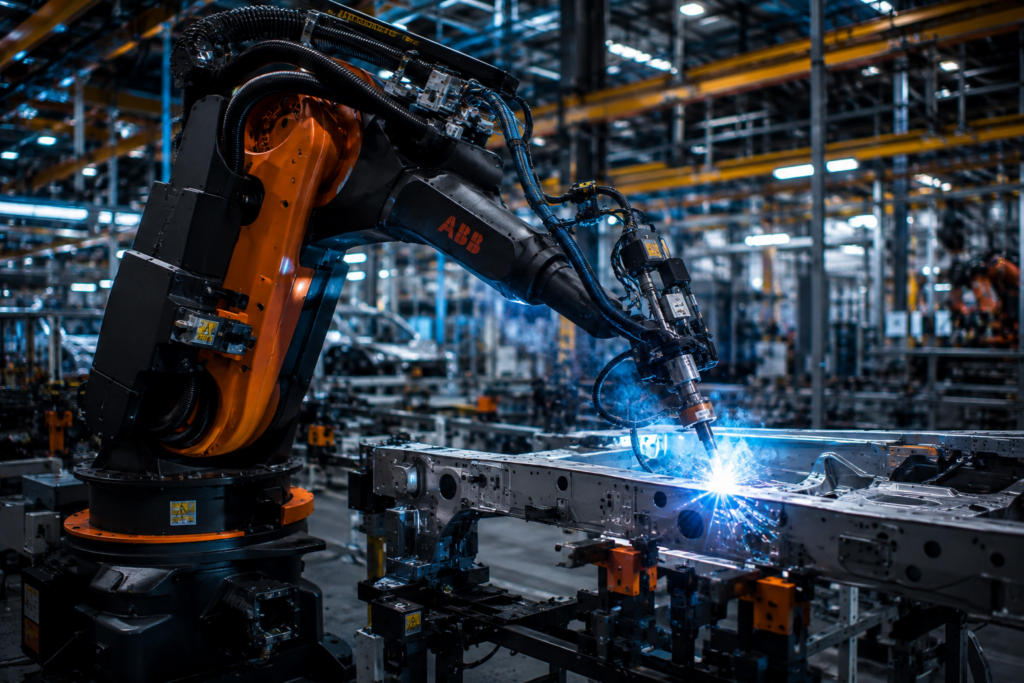
You’ve got a welding cell to automate, a palletizing line that’s killing throughput, or a parts-transfer application that three different vendors have quoted three completely different solutions for. Someone on your team says “just get a six-axis.” That’s not wrong , but it’s not a spec sheet either. Before you cut a PO, you need to understand what an articulated robot arm actually is, how it moves, where it excels, and which numbers actually matter when you’re comparing models. This guide covers all of it, without the brochure language.
What Is an Articulated Robot Arm?
An articulated robot arm is a robotic manipulator made up of rigid links connected by rotary joints. Each joint adds a degree of freedom, meaning another axis of independent movement. Most industrial models have six axes , which is why you’ll hear “6 axis robot arm” used almost interchangeably with “articulated robot.”
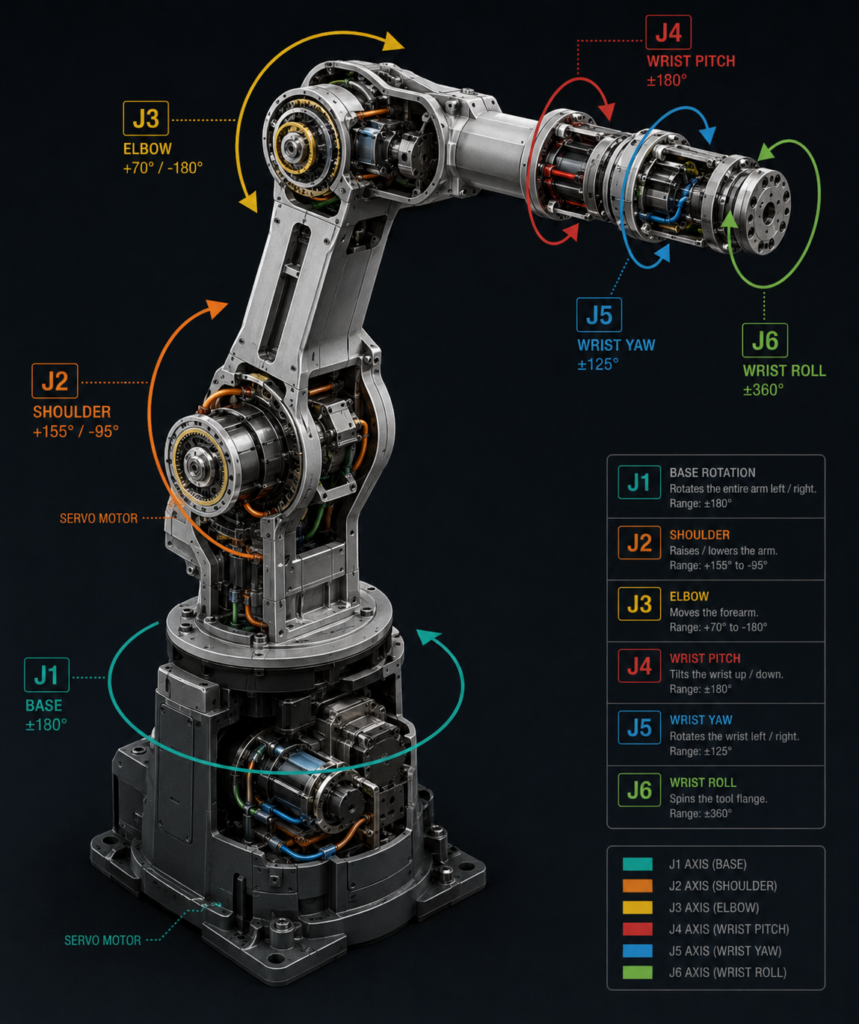
The joints are typically driven by servo motors with gear reduction, giving the arm precise, repeatable positioning across its entire work envelope. The base rotates. The shoulder and elbow joints handle large positional moves. The wrist , usually a three-axis assembly , handles orientation. Together, those six axes let the arm reach virtually any position and angle within its physical range.
Compare that to a SCARA arm, which is fast and stiff in the vertical axis but limited to four degrees of freedom. Or a delta robot, which is screaming fast in a small pick zone but can’t reorient a part. The articulated arm trades raw speed for versatility. It can weld, assemble, machine, palletize, paint, and inspect , often without changing the mechanical platform, just the end effector and the program.
The tradeoff is complexity. Six axes means six servo loops, six encoders, and a controller that’s solving inverse kinematics in real time to figure out how to move all of them simultaneously. That’s more to commission, more to troubleshoot, and more to maintain. But for most flexible automation applications, it’s the right tradeoff.
The Six Axes Explained
When you’re evaluating a 6 axis robotic arm, it helps to know what each joint actually contributes , because axis limits and speed ratings are listed per axis in every spec sheet, and those numbers have real implications for your application.
Axis 1 (J1) is the base rotation. This determines how much horizontal sweep the robot has. Most standard arms cover ±170° or more. If you need the robot to service two conveyors on opposite sides, J1 range is what makes or breaks that layout.
Axes 2 and 3 (J2, J3) are the shoulder and elbow. These handle the bulk of large positional moves and consume the most torque. Rated speeds here , typically 100–175°/s on a mid-size arm , set your cycle time ceiling for big reach moves.
Axes 4, 5, and 6 (J4, J5, J6) are the wrist. J6 in particular spins fast , 360–450°/s is common , because it handles tool orientation without moving the whole arm. If you’re doing tight-clearance assembly or sensor-guided inspection, wrist axis range and speed matter as much as overall reach.
One spec that gets overlooked: wrist singularity. This is the condition where two wrist axes align and the robot loses a degree of freedom momentarily. Every 6-axis arm has this. Good controllers handle it gracefully. Cheap or older ones don’t. I’ve seen a robot stop dead mid-cycle because nobody configured singularity avoidance in the path planner. It took two days to diagnose.
Key Specs That Actually Matter
Every articulated robot arm listing shows the same spec categories. Here’s what each one actually tells you , and where the hidden gotchas are.
Payload is the maximum load the robot can carry at the wrist, measured in kilograms. A 20 kg payload robot doesn’t mean you can hang a 20 kg gripper on it , that 20 kg includes the weight of your end effector. A heavy gripper on a borderline payload rating will cause torque faults and shorten gearbox life. Size up.
Reach is the maximum radial distance from the base to the tool center point with the arm fully extended. A 1,800 mm reach sounds like a lot until you map it against your cell and realize the robot needs to reach 1,600 mm while maintaining a specific wrist angle , which puts you well inside your margin. Always model reach in your actual application pose, not just the maximum.
Repeatability is not accuracy. Repeatability is how consistently the robot returns to a taught point , typically ±0.02 mm to ±0.1 mm for industrial arms. Accuracy is how close the robot gets to an absolute coordinate in space without teaching. Most industrial robots are highly repeatable but only moderately accurate. If you’re doing offline programming with a CAD model, that distinction matters enormously.
IP rating is the ingress protection classification. IP67 means fully dust-tight and can handle immersion up to 1 meter. If you’re in a washdown environment or running near coolant, verify the arm’s IP rating , and the rating of the controller separately, because they’re often different.
You can compare full specs on any articulated arm side by side using the compare tool at factoryrobots.net. Worth running before you shortlist.
Common Applications for Articulated Robots
The articulated robotic arm dominates industrial automation for one reason: it can do more tasks without being redesigned. Here’s where you’ll see them deployed most often.
Arc and spot welding is probably the highest-volume application globally. FANUC, KUKA, and ABB have all built welding-optimized variants with hollow wrists for routing welding cable and gas hose through the arm body. The FANUC ARC Mate series and ABB IRB 1520ID are purpose-built for this. If you’re welding, you want a hollow-wrist arm , cable management on an external-dress arm in a welding cell is a maintenance nightmare.
Palletizing uses large-payload articulated arms , typically 100 kg and above , to stack product onto pallets at the end of a line. KUKA’s KR QUANTEC and FANUC’s M-410 series are workhorses here. Cycle time and payload dominate the spec discussion. Repeatability matters less; you’re placing a box, not inserting a pin.
Machine tending , loading and unloading CNC machines, presses, and injection molding equipment , is a strong fit for mid-size 6-axis arms in the 10–20 kg payload range. The articulated arm handles the part reorientation that a SCARA can’t.
Assembly favors smaller, high-repeatability arms. The Universal Robots UR10e or ABB IRB 1300 operate in the ±0.03 mm repeatability range, which covers most precision assembly tasks outside of semiconductor work.
Collaborative vs. Traditional Articulated Arms
The rise of collaborative robots (cobots) has added a wrinkle to the articulated arm category. Cobots like the UR5e, FANUC CRX-10iA, or KUKA LBR iisy are articulated 6-axis arms, but they’re designed to operate near people without full safety guarding , using force/torque limiting to stop on contact.
The tradeoff is speed and payload. Most cobots cap out around 16 kg payload and run at reduced speeds compared to traditional industrial arms. The ISO/TS 15066 standard governs collaborative robot safety requirements , it’s worth reading before you design a cell around a cobot, because “collaborative” doesn’t automatically mean “no guarding required.” The actual allowed operating speeds depend on the body part at risk, the contact force limits, and the specific application geometry.
Traditional industrial arms are faster, carry more, and are more rigid at high speeds. If you have a guarded cell and you need throughput, a traditional articulated arm almost always wins. If you need human-robot cooperation in the same workspace, or you’re deploying into a facility without the budget or space for full perimeter guarding, a cobot is the realistic option.
I spent weeks trying to make a cobot hit cycle time targets that a traditional arm would have cleared comfortably. The physics aren’t negotiable. Know your throughput requirement before you choose the platform.
Integration Considerations Before You Buy
Buying the arm is the easy part. Integration is where projects run long and budgets get eaten. A few things to plan before you order.
Controller compatibility with your PLC or SCADA system is non-negotiable to confirm upfront. Most modern arms support EtherNet/IP, PROFINET, or EtherCAT , but verify which protocols are standard versus optional add-ons, because fieldbus cards can cost $2,000–$5,000 extra.
End effector mounting follows the ISO 9283 flange standard for most industrial arms. Confirm your tooling vendor’s interface matches. If you’re running a pneumatic gripper, also confirm the arm has internal air lines or budget for external routing.
Reach and envelope modeling should happen in simulation before you finalize cell layout. RoboDK and KUKA.Sim are widely used. The first time I skipped this step, we ended up with a cell where the robot couldn’t reach the far station without a riser , which nobody budgeted for.
For integration support and application questions, the engineering team at factoryrobots.net/support/ can help you work through configuration before you commit to a model.
The IFR’s World Robotics reports (available at ifr.org) are also a useful reference for understanding deployment trends and reliability benchmarks across robot categories , useful context when you’re justifying a purchase to management.
For safety standards, ISO 10218-1 and ISO 10218-2 cover industrial robot safety requirements for the robot itself and the integration respectively. Both are referenced by every reputable integrator and worth having on hand during cell design. You can access them through the ISO standards catalogue at iso.org.
Key Takeaways
- Articulated robot arms offer the most versatile motion profile in industrial automation , six rotary joints give you full 3D positioning and orientation, which no other robot type matches.
- Payload ratings include your end effector weight , always size up rather than run at the rated limit to protect gearboxes and avoid torque faults.
- Repeatability and accuracy are different specs. For taught-point programs, repeatability is what matters. For offline CAD-based programming, accuracy becomes critical.
- Cobots are articulated arms too, but speed and payload are capped by their force-limiting safety design , know your cycle time requirements before choosing cobot over traditional.
- Integration costs , controller fieldbus cards, end effector interfaces, simulation software, cell guarding , routinely add 30–60% to the base arm price. Budget for them from day one.
Frequently Asked Questions
What is the difference between an articulated robot arm and a SCARA robot? A SCARA robot has four axes and is optimized for fast, flat pick-and-place in a horizontal plane , it’s very rigid in the Z axis but can’t reorient parts freely. An articulated robot arm has six axes and can reach any position and angle within its envelope, making it far more versatile but more complex to program and commission.
How much does a 6 axis robot arm cost? Entry-level collaborative 6-axis arms like the UR5e run roughly $35,000–$45,000 for the arm and controller. Mid-size traditional industrial arms in the 20–50 kg payload range typically fall between $50,000–$120,000. High-payload arms for palletizing or heavy material handling can exceed $200,000. These are arm-only prices , integration, tooling, and safety systems are additional.
What payload rating do I need for my application? Take the weight of your end effector, add the weight of the heaviest part you’ll handle, then add 20–25% margin. If your gripper weighs 4 kg and your part weighs 8 kg, you need at least a 15 kg payload arm , not a 12 kg. Running at the rated limit shortens gearbox life and increases fault frequency.
Do articulated robots require safety guarding? Traditional industrial articulated arms require perimeter guarding because they move fast enough and carry enough force to cause serious injury. Collaborative articulated arms are designed for reduced-speed human interaction and may not require full guarding in all configurations , but this depends on the specific application, speeds, and payload. ISO 10218 and ISO/TS 15066 define the requirements. Always conduct a formal risk assessment.
Picking the Right Articulated Arm for Your Cell
The articulated robot arm is the workhorse of industrial automation for good reason , it handles more application types than any other robot platform. But “get a six-axis” isn’t a procurement decision. Payload margin, reach in your actual application pose, repeatability relative to your tolerance stack, and controller compatibility with your existing infrastructure all need to be verified before you sign anything.
Browse the full articulated arm lineup , with complete specs and direct pricing , at factoryrobots.net/shop/. No quote forms. No sales calls. If you need to talk through an application before you buy, the engineering support team is available at factoryrobots.net/support/.